Features
Feaso Cloud is a property development feasibility platform for Australian developers, in every state and territory. This page lists what it does today, in the order you build a feaso: set up and program, costs and land, sales and leasing, finance, then cashflow and returns.
Set up and program
7 features
Set up the project once, then lay out the program the rest of the feasibility runs on.
Project information
Name, project number, state or territory, date, description and the project start date that month 1 runs from.
All eight states and territories
ACT, NSW, NT, QLD, SA, TAS, VIC and WA, each with its own stamp duty and land tax tables.
Development summary
Residential, commercial, retail and custom rows with quantities, net saleable or lettable area (NSA or NLA) and gross floor or building area (GFA or GBA).
Development program
The standard tasks (Acquisition, Concept Design, Town Planning, Design Development, Early Works, Construction and Operation) plus your own, each with a start month and duration.
Drag to reorder, with auto shift
Move tasks into a new order and have the tasks after them follow.
Derived phases
Development, Design, Whole Project, Major Consultant and Minor Consultant phases are worked out from the tasks, so cost lines and sales can be timed to them.
Feasibility phases
Split the project into sub-phases and report returns for each one or for the whole project. (Pro and Team)
Costs and land
11 features
Enter costs in standard cost groups, timed to the program and spread by month.
Cost groups
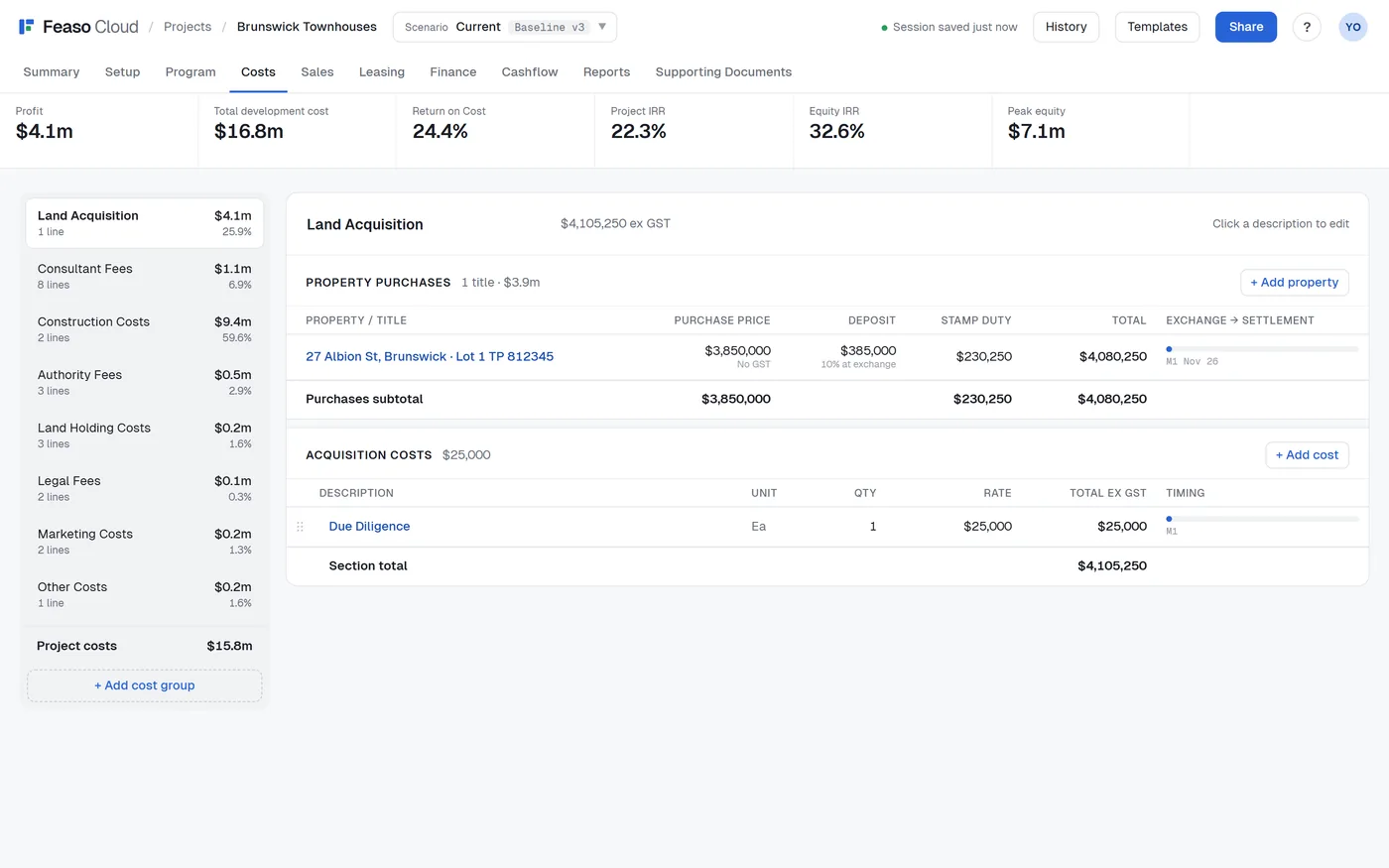
Input costs into the standard groups, or create your own custom groups.
Cashflow timing by phase or month
Each line runs over a program task, a derived phase or custom start and end months.
Six cashflow distribution curves
Each designed to quickly distribute cashflow according to a realistic spend pattern.
Escalation
Ensure your costs account for future expected price rises.
Contingency
Easily add contingency and link it to any cost group's total as a percentage.
Quick feaso
Set a cost group as a percentage of construction costs instead of entering its lines, for a quick early-stage estimate.
Property purchases
Land tax already calculated for the development phase and revalued at the operation stage. Mark a property as already owned and recognise its value in the feasibility without entering a dummy purchase.
Stamp duty, calculated
Duty is worked out per property from the state's dated schedule, by land use, with the foreign purchaser surcharge where it applies. Enter your own amount to override it.
Land tax, calculated
Land tax from the state's schedule, by owner type (individual, company, trust or foreign), charged monthly or as an annual assessment, with separate site values for the development and operating phases. WA projects can add the Perth metropolitan region levy.
GST on costs
Each line is marked as carrying GST or not, and input tax credits flow through the BAS.
Line notes
Keep a note on any cost line, sales line or tenancy.
Sales and leasing
13 features
Model build-to-sell lots, leased income and investment sales side by side.
Build-to-sell lots
Quantity, unit and rate per lot, with price escalation to sale.
Pre-sales and settlement timing
A pre-sale period, sold month and settlement month for each line, by phase or by month.
Deposits
A deposit percentage per line, held in trust until settlement or released to the developer.
Sales commissions
Pre-sale and settlement commission percentages per line.
GST on sales
Add GST, GST-inclusive, margin scheme or not charged, set for the project or per line, with purchaser GST withholding.
Tenancy schedule
Commercial and residential tenancies with rent per week, month or year, lease term, commitment and commencement months.
Rent growth and reviews
Rent growth to lease commencement, then annual reviews.
Incentives
Rent free, rent abatement and fit-out contributions, against a target total incentive.
Outgoings recovered
Choose which operational outgoings each tenant recovers, shared automatically or by an override.
Vacancy and lease-up
A vacancy allowance and a lease-up period to full occupancy.
Leasing commissions
A commission as a percentage of rent, with part paid at commitment.
GST on residential rent
Input taxed, taxable as commercial residential premises, or Division 87 for long-term stays.
Investment sales
Sell leased tenancies at a cap rate, net of purchaser's costs and outstanding incentives.
Finance
10 features
Size each debt facility and let the cashflow draw, charge and repay it month by month.
Facility types
Interest only, capitalised interest, and principal and interest.
Drawdown
Progressive, or the whole limit at the start.
Limits
A fixed amount, a loan-to-value or loan-to-cost ratio on the basis you choose, or an interest cover ratio.
Fixed or BBSW rates
A fixed all-in rate, or a margin over the 3-month BBSW rate.
BBSW from ASX
The BBSW rate is read from ASX each weekday. Your working feasibility takes the latest rate when you open it, and saved versions keep the rate and date they were saved with.
Fees
Application and line fees on each facility.
Start and repayment
Set the start month, or have a capitalised loan's earliest start worked out from its repayment month.
Minimum equity before first draw
Hold the first draw until the lender's equity requirement is met.
Refinancing
Repay a facility from equity or refinance it with a later one.
Funding waterfall
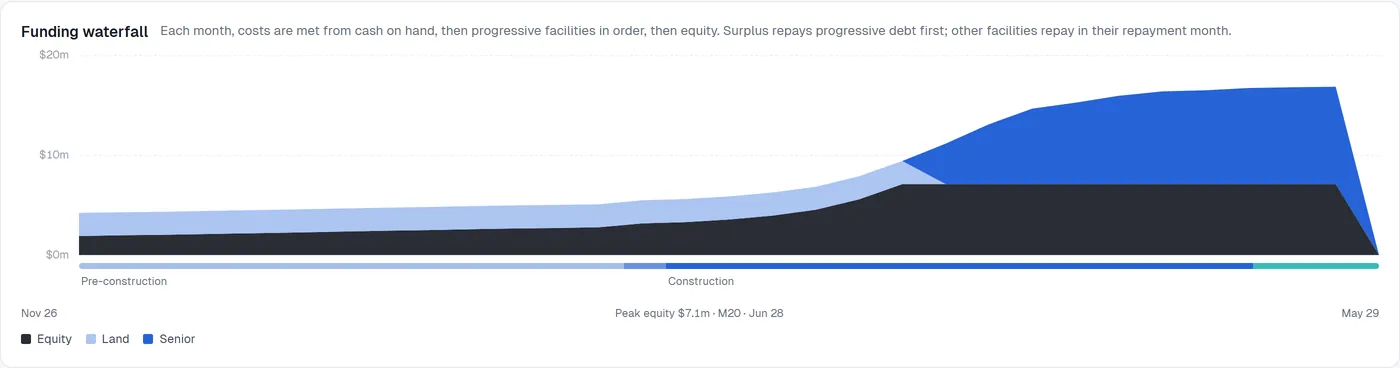
Equity and each facility's balance month by month, with peak equity marked.
Cashflow and returns
9 features
Results recalculate as you work, in the browser, with every figure traced to a month.
Monthly cashflow
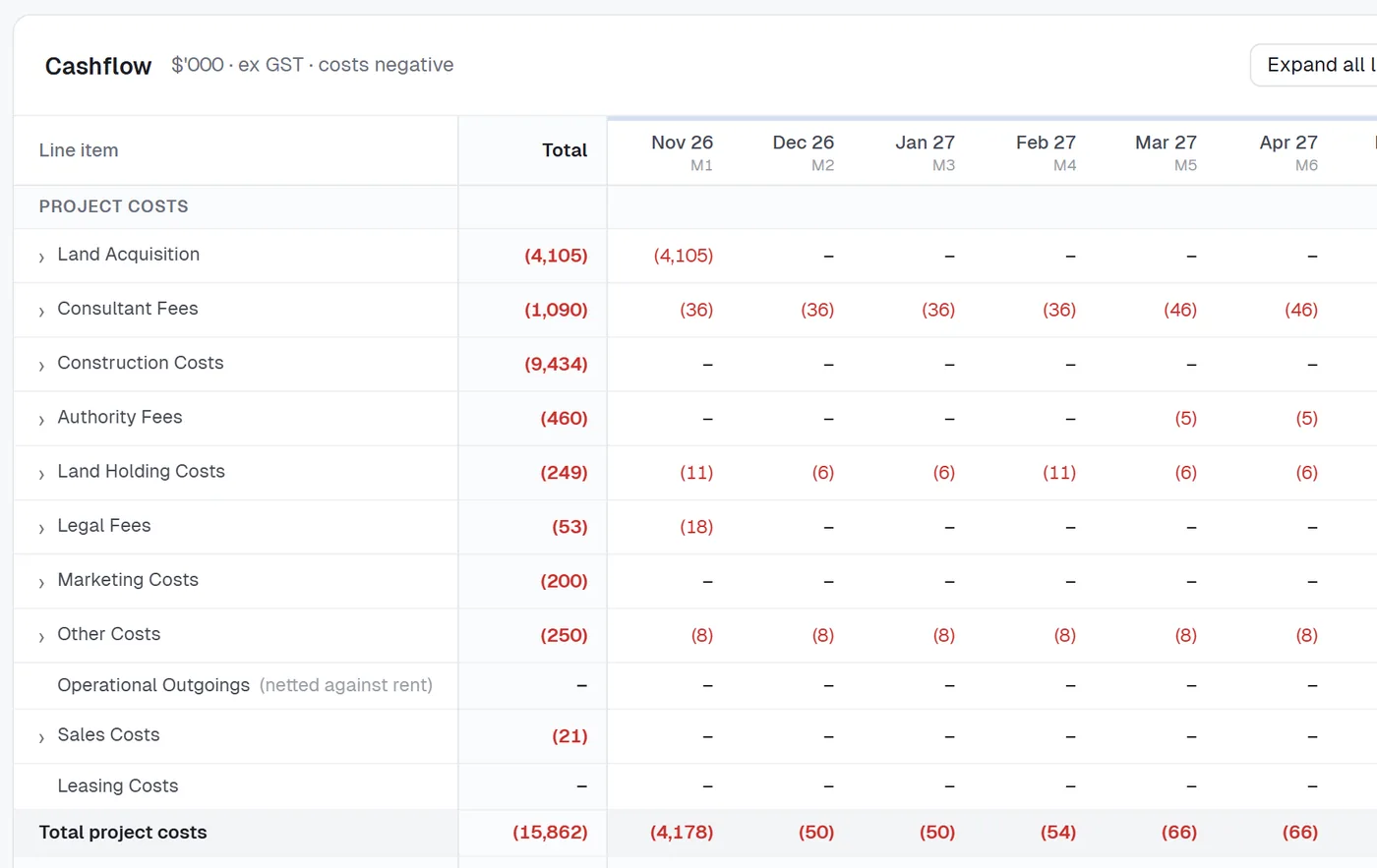
Every cost, sale, rent, GST, finance and equity line by month, shown monthly, quarterly, by financial-year quarters or annually, in $'000 or $m.
GST and the BAS
Monthly or quarterly BAS periods, with GST collected, paid and refunded in the cashflow.
Key figures
Profit, total development cost, Return on Cost, Project IRR, Equity IRR and peak equity in a strip across the top of every tab.
More returns
Development margin, return on equity, project and equity NPV, and peak equity month.
Hurdles
Set target hurdles for each feasibility and see at a glance which pass.
Residual land value
The land price at which the project exactly meets each hurdle.
Sensitivity
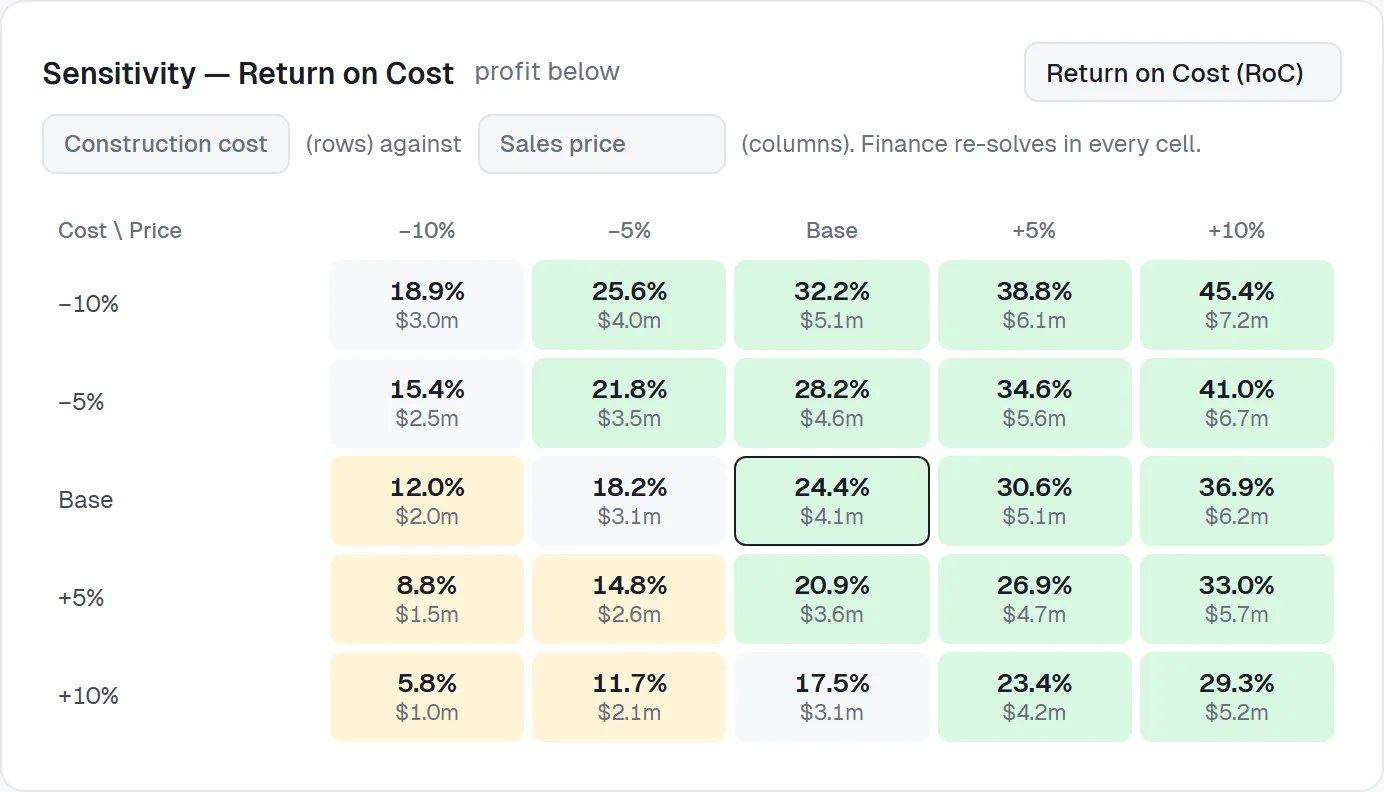
A grid of RoC, RoE, Project IRR or Equity IRR across any two of construction cost, sales price, cap rate, program delay, interest rate and land price.
Capital stack over time
Debt and equity through the life of the project.
TDC
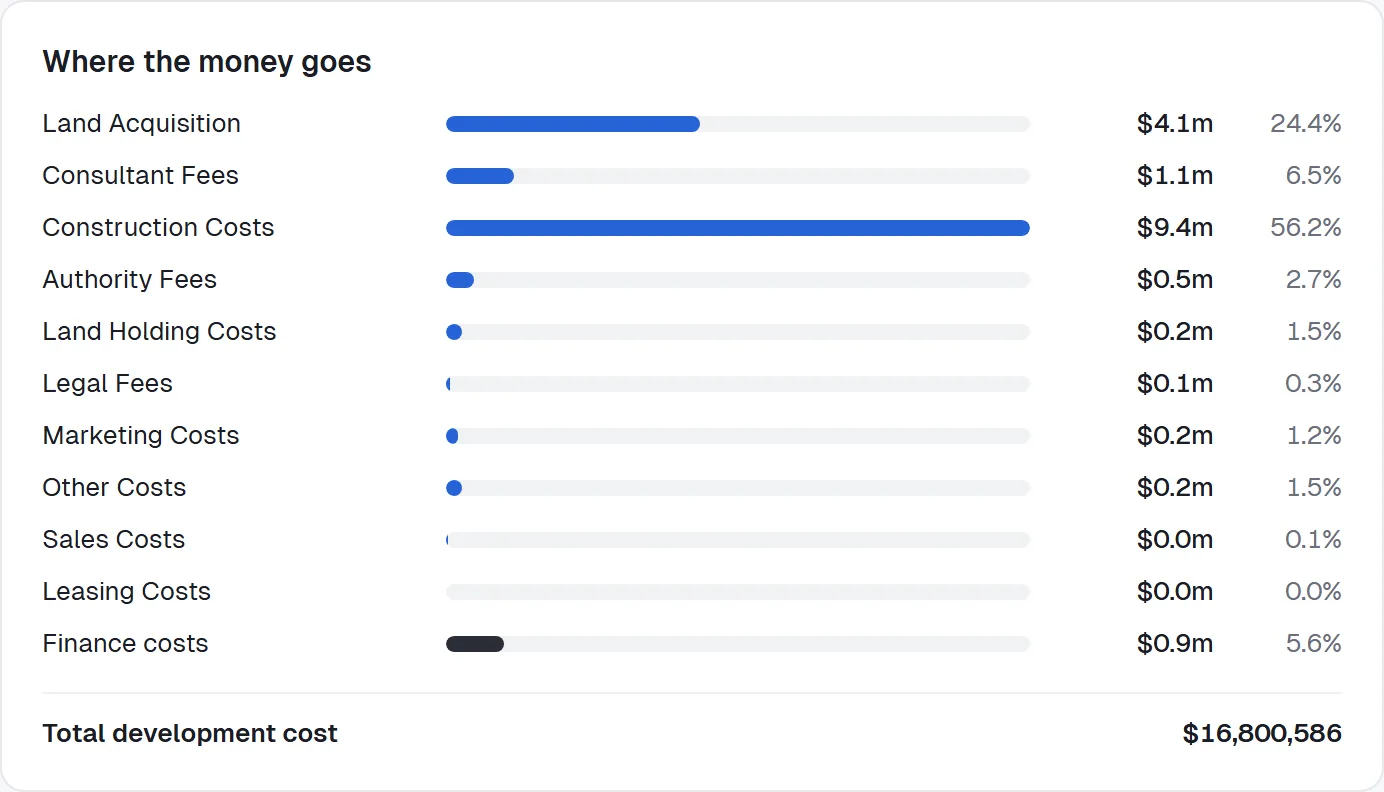
Costs by group at a glance.
Scenarios and history
6 features
Work in one place, save versions when you're ready, and keep a record of every change.
Current
Your working session saves as you go. Edits stay in Current until you save them to a scenario.
Versioned scenarios
Save Current as a new version of a scenario (Baseline v1, v2, v3) and load any version back.
Several scenarios
Save Current as a new scenario to test another design, price or structure.
Compare scenarios
The Summary tab sets each scenario's returns side by side, and the key figures show the change against the scenario you started from.
History
Every change to the project's inputs, with who made it, when, and the old and new values, plus every scenario action.
Calculation method on each feasibility
Change how the engine treats a feasibility, or apply a newer version of your organisation's method when you choose.
Reports and exports
7 features
Lender-ready reports from the feasibility you see on screen.
- Profit
- $4.1m
- TDC
- $16.8m
- RoC
- 24.4%
- Equity IRR
- 32.6%
- Cover
- Summary
- Program
- Costs, detailed
- Sales
- Finance
- Monthly cashflow
Feasibility summary
A PDF report for sign-off: cover page, summary, costs, sales, leasing and finance.
Lender pack
A PDF with the program, detailed costs, sales and leasing, finance and the monthly cashflow.
Build your own report
Tick the sections you need, Summary or Detailed for costs, sales and leasing, and save the combination for next time.
Live preview
The Reports tab shows the report page by page before you export it.
Your branding
Your logo and trading name on the cover and in headers, and a cover photo for each project.
Excel exports
Any tabs to Excel, one sheet per tab, values only.
Calculation method appendix
Every report and export ends with the method used and any setting that differs from Feaso Cloud's standard.
Documents and templates
3 features
Keep a project's files with the figures they support, and start new projects from a template or a workbook.
Supporting Documents
Upload PDFs, Word and Excel files, CSVs, images and emails to a project, with 10 GB of storage on Pro and 50 GB on Team. Each document can be linked to specific items in the feasibility.
Built-in templates
Create your organisation's own standard templates to speed up the new feasibility process.
Import an existing feaso
Fill in the import template, import an EstateMaster DF file as it is, or let the AI Importer read your own custom Excel model.
Teams and settings
6 features
Set up your organisation once, then bring in your team.
Guided set-up
A first-run set-up for your organisation and defaults, a tour of the workspace and a getting-started checklist.
Projects browser
Folders, project status from feasibility to completion, owner and last edited, with RoC, development margin and Equity IRR highlighted against each project's hurdles.
Calculation method
Named, versioned methods for your organisation, with Feaso standard built in. Choose the default for new feasibilities and preview a change's effect on up to five projects. Changing a method never changes an existing feasibility.
Method proposals
Admins propose method changes with a note, and owners approve or reject them.
Members and roles
Owners, admins and members, each with what their role allows.
Invitations and seats
Invite people by email. Team includes 3 seats, and owners can add more.
Security and hosting
6 features
How your organisation's data is protected.
Hosted in Australia
Feaso Cloud runs on DigitalOcean in its Sydney region, with its database and file storage there too.
Two-factor sign-in for everyone
Every person sets up an authenticator app at first sign-in, with recovery codes. Trusted devices are asked again at least every 30 days.
Organisation data kept apart
Every organisation's data is isolated in the database, and one organisation can never read another's.
Encrypted backups
The database is backed up every night, encrypted, as well as the database host's own daily backups.
Malware scanning
Every uploaded document is scanned before it can be opened.
Encrypted connections
All traffic is encrypted in transit.
Development types
5 types
Feaso Cloud models build-to-sell lots, leased income and investment sales in the same feasibility, so it suits:
- Residential apartments and townhouses
- Land subdivision
- Build-to-rent
- Commercial and retail, including refurbishment
- Mixed use, with residential, commercial and retail in one development summary